


Your conversion rate is flat. Traffic is fine. The ads are running. But sales aren't moving. So you do what most businesses do — you go looking for a tool to fix it.
You scan a few listicles, pick something that sounds credible, and set up a heatmap or an A/B testing platform. Six weeks later, you have a lot of data and no idea what to do with it.
The problem isn't the tool. The problem is that you bought a solution before you understood the diagnosis.
Conversion rate optimization tools are genuinely powerful — but only when you know what category of problem you're trying to solve. The CRO software market reached $1.2 billion in 2024 according to Credence Research, and it's growing rapidly. There are hundreds of tools competing for your attention, your subscription, and your trust. Most businesses end up using the wrong category first and wondering why their numbers aren't moving.
This guide breaks the CRO tools landscape into five functional categories — what each one does, when it's useful, and critically, which one most businesses should be using before they invest in anything else.
Why Category Matters More Than the Tool Itself
Brian Massey, founder of Conversion Sciences and one of the earliest practitioners in the CRO field, put it plainly in an interview with ODOSCOPE: "If I gave you ten 'quick wins,' I would be wrong on half of them for your particular audience, and neither of us would know which half would be wins."
That's the core problem with how most businesses approach CRO tools. They look for a universal fix — a heatmap tool, a testing platform, a personalization suite — without first asking what their specific problem actually is.
The five categories of CRO tools are not interchangeable. Each one answers a different question at a different stage of the optimization process. Buying an A/B testing platform without knowing what to test is the equivalent of buying a scalpel before you've run any diagnostics. You have the instrument, but you don't know where to cut.
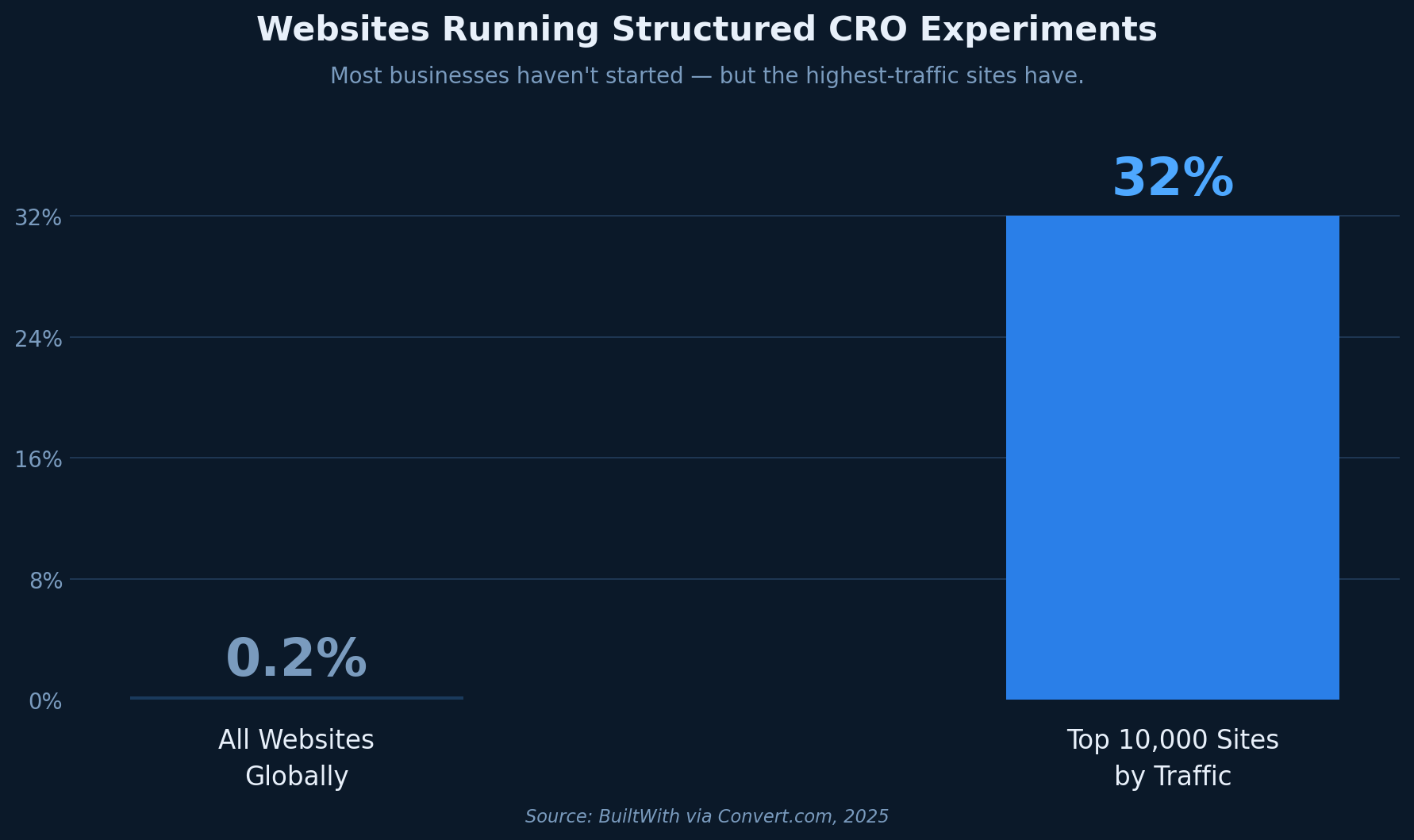
Data from BuiltWith and Convert confirms how wide this gap remains. Only about 0.2% of all websites currently run structured experiments, and even among the top 10,000 sites by traffic, only 32% use an A/B testing or personalization platform. Most businesses are not doing this systematically — and many that are still struggle with a fundamental sequencing problem.
Category 1 — Analytics and Traffic Data Tools
Analytics tools are the foundation of any CRO program. They tell you what is happening on your site at a macro level — which pages get traffic, where users enter and exit, how traffic sources behave differently, and where the numbers drop off in your funnel.
The most widely used tools in this category are Google Analytics 4 and Mixpanel, with Amplitude and Heap serving teams that need more granular event tracking. For most businesses, GA4 is the starting point — free, deeply integrated with Google's advertising ecosystem, and capable of answering the basic funnel questions that inform every optimization decision downstream.
What analytics tools tell you: Where your biggest traffic concentrations are, which pages have the highest exit rates, how different traffic sources convert, and where the funnel breaks down numerically.
What they don't tell you: Why users are leaving, what they're looking at, or what's stopping them from converting. Analytics answers the "what" but not the "why."
When to use this category: At the very beginning. Before any other tool, you need to understand your traffic and funnel data at a macro level. If you can't identify your highest-exit pages or your lowest-converting traffic segments, you have no starting point for optimization.
Category 2 — Behavior and Heatmap Tools
Once you know where the drop-offs are, heatmap tools help you visualize how users interact with individual pages. They generate click maps, scroll maps, and attention maps that show where users focus, how far they scroll, and which elements they engage with.
The dominant tools in this category are Hotjar, Microsoft Clarity (free), and Crazy Egg. Mouseflow and Lucky Orange offer similar functionality with different pricing models.
What heatmap tools tell you: How users interact with specific page elements — whether they're clicking on the right CTA, whether they're scrolling past your key value proposition, whether a non-clickable element is attracting clicks and creating confusion.
What they don't tell you: The full story of an individual user's session, what happens across multiple pages, or why a user made a particular decision. Heatmaps are aggregated — they show patterns across many sessions, not the narrative of any single visit.
When to use this category: After you've identified your problem pages through analytics. Heatmap tools are most valuable when you already know which page has a problem and want to form a hypothesis about what's causing it.
Category 3 — Session Recording Tools
Session recording tools capture individual user sessions as video replays. You can watch a real visitor navigate your site, see where they hesitate, where they rage-click, where they scroll back up as if re-reading something, and where they abandon.
FullStory, LogRocket, and Smartlook lead this category. Many heatmap tools like Hotjar and Mouseflow include session recording as a bundled feature.
What session recording tools tell you: The qualitative, narrative-level view of a user's experience. You can observe friction, confusion, and hesitation in a way that aggregated data cannot convey. Watching someone scroll past your pricing section three times before abandoning tells you something no click map can.
What they don't tell you: Whether what you observed is representative of your broader audience. A single session replay is a data point, not a data set. The real value comes from reviewing dozens or hundreds of sessions to identify repeating patterns.
When to use this category: In parallel with or after heatmap analysis, once you've identified a problem page and want to build a richer picture of the specific friction patterns occurring there.
Category 4 — A/B Testing and Experimentation Platforms
A/B testing tools are the most discussed and most purchased category in the CRO landscape — and the most frequently misused. These platforms let you serve different versions of a page or element to different segments of traffic simultaneously and measure which version produces better outcomes.
The major tools in this category are Optimizely, VWO, Convert, and AB Tasty for mid-market and enterprise teams. Unbounce, Google Optimize's successor tools, and Shopify's native testing features cover simpler use cases.
What A/B testing tools tell you: Whether a specific change — a different headline, a reordered page layout, a new CTA — produces a statistically significant improvement in a defined metric.
What they don't tell you: What to test. This is the category's fatal limitation for businesses at early optimization stages. An A/B test is only as good as the hypothesis behind it. Without a well-formed hypothesis grounded in behavioral data, you're testing randomly and hoping for a win.
Craig Sullivan, one of the UK's most cited experimentation practitioners, wrote on LinkedIn: "People make a fundamental mistake when they confuse the value of a test with the lift or impact that it has. The value of a test comes in the 'unit of information' that arrives when you know what the result is."
The practical implication: if you don't know what question you're trying to answer before you run a test, a positive result teaches you almost nothing actionable. Yet according to the Speero Experimentation Maturity Program Report 2025, 58% of companies still don't have a clear prioritization framework for deciding what to test. They have the platform. They're running tests. But they're not doing it systematically.
When to use this category: After you have a clear hypothesis backed by behavioral data. A/B testing is the validation stage — it confirms or disproves a specific change you believe will improve a specific metric for a specific reason. It is not a starting point.
Category 5 — Website Diagnostic and Audit Tools
This is the category most businesses skip entirely. Diagnostic tools scan your website and surface conversion barriers across the major categories that prevent visitors from completing their intended actions — structural friction, trust failures, unclear value propositions, checkout problems, and technical performance issues.
Unlike analytics tools, which require you to interpret raw data yourself, diagnostic tools synthesize findings and tell you specifically what is broken and why it is likely hurting your conversion rate. Unlike heatmaps, they don't require significant traffic volume to produce actionable outputs. Unlike A/B testing platforms, they don't require a pre-existing hypothesis.
What diagnostic tools tell you: A prioritized map of conversion barriers across your entire site or specific pages, grounded in CRO principles and behavioral research, delivered fast enough to act on immediately.
What they don't tell you: Whether a specific fix will produce a measurable lift — that's what A/B testing is for. Diagnostic tools identify what to address; experimentation validates whether the fix works.
When to use this category: Before anything else. This is the category most businesses need first and buy last. Starting with a diagnostic gives you the specific hypotheses that make heatmaps more targeted, session recordings more purposeful, and A/B tests more likely to produce meaningful results.
BluePing is a website conversion diagnostic built for this stage of the process. It scans a page in approximately 30 seconds and surfaces conversion barriers across 19 rules spanning SaaS, ecommerce, and SEO — including trust signals, checkout friction, value proposition clarity, and on-page SEO factors that affect how well the page performs in search and after arrival. The output is a structured, evidence-backed report that tells you not just that a problem exists but why it matters and what category of fix to prioritize.
For businesses that haven't yet built out a full CRO stack, BluePing answers the single most important question first: what is actually stopping visitors from converting on this specific page?
The Sequence That Actually Works
The most effective CRO programs move through the categories in a specific order. The sequence isn't rigid, but the logic is:
Diagnostic tools identify where and what the problems are. Analytics tools quantify the scale of each problem and help you prioritize by traffic and drop-off volume. Heatmap and session recording tools help you understand exactly how the friction manifests at the behavioral level. A/B testing validates that a specific fix actually improves the metric.
The businesses that get the fastest results from CRO tools are not the ones with the largest tech stacks. They're the ones who know what they're trying to fix before they pick up any tool.
How to Choose the Right Tool for Your Stage
If you're just starting: run a diagnostic scan on your highest-traffic pages before spending anything on a subscription. Know what you're fixing first.
If you have traffic but low conversion on specific pages: add analytics and heatmap tools together to quantify the problem and observe how users behave on those pages.
If you've identified a behavioral pattern but want to validate a fix at scale: that's when an A/B testing platform earns its subscription cost.
The CRO tools market will keep expanding — the Credence Research figure of $1.2 billion in 2024 is projected to more than double by 2032. There will always be another tool promising to solve your conversion problem. But no tool solves a problem you haven't diagnosed yet.
Start with the question, not the software.
Your site may already have conversion barriers costing you revenue on every page. BluePing scans a URL in about 30 seconds and delivers a diagnostic report covering 19 conversion rules across checkout friction, trust signals, value proposition clarity, and on-page SEO.



.png)